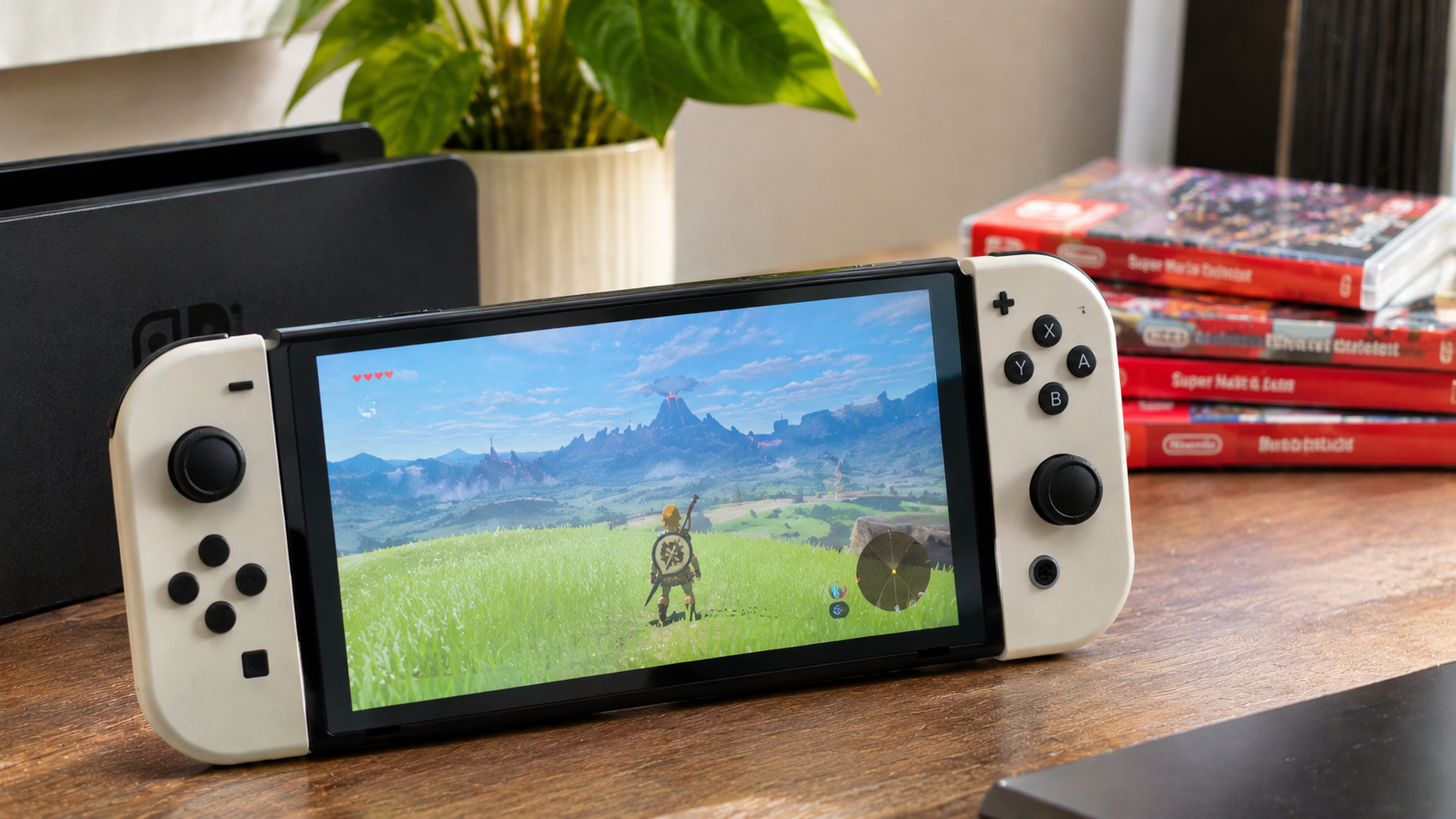


Most original Nintendo Switch games work on Nintendo Switch 2, including compatible physical cartridges and digital purchases. However, not every game runs correctly, some require original Joy-Con controllers, and a few cannot be played at all. Checking Nintendo Switch 2 game compatibility before buying is particularly important when choosing a game as a Christmas gift.
The biggest exception is Nintendo Labo Toy-Con 04: VR Kit, which cannot be played on Switch 2. Other popular titles, including Ring Fit Adventure, remain playable only with specific accessories or older controllers. Some games also receive free performance updates, while others offer separate paid Nintendo Switch 2 Edition upgrades.
The distinction matters heading into the 2026 holiday shopping season. A discounted Nintendo Switch cartridge may be an excellent gift for a Switch 2 owner, but the wrong edition, missing accessory, or incompatible game can turn a promising purchase into a disappointment.
Nintendo maintains an official compatibility database, and individual game pages identify their current support status. The practical questions are straightforward: which games work, which need extra equipment, what happens to existing purchases, and whether save data can be carried over.
Can Nintendo Switch 2 Play Original Nintendo Switch Games?
Yes. Nintendo Switch 2 supports compatible original Nintendo Switch games in both physical and digital formats. A compatible Switch cartridge can be inserted into the newer console, while previously purchased digital games can be accessed through the Nintendo Account that owns them.
This feature is called backward compatibility. It allows players upgrading from the original Switch, Switch Lite, or Switch OLED to retain access to much of their existing game collection.
However, backward compatibility does not guarantee that every title works perfectly or gains better graphics. Some games run much as they did on the original system, some receive enhancements, and others have limitations caused by differences in hardware or controller features.
The main compatibility scenarios are summarized below.
| Game or content type | Works on Switch 2? | What to know |
| Compatible original Switch cartridge | Yes | Insert the game card; an update may be required |
| Compatible original Switch digital game | Yes | Use the Nintendo Account that owns it |
| Switch game with a free Switch 2 update | Yes | Download the update to access improvements |
| Switch game with a paid Switch 2 Edition | Yes | Original game works; upgrade adds supported enhancements |
| Game requiring original Joy-Con | Conditional | Older controllers or accessories may be necessary |
| Game with unresolved compatibility problems | Conditional | Check the individual game's status |
| Nintendo Labo VR Kit | No | Switch 2 does not fit the VR Goggles |
| Switch 2-exclusive game on original Switch | No | New-generation exclusives do not run on the older console |
The important distinction is between a game being playable and a game being fully supported with every original feature. A title can launch successfully while still requiring additional hardware or having a known technical problem.
How to Check Nintendo Switch 2 Game Compatibility Before Buying
The most reliable way to check Nintendo Switch 2 game compatibility is to use Nintendo's official game database or the product page for the exact title.
Nintendo provides a dedicated Nintendo Switch 2 compatibility page explaining supported software, known limitations, and controller requirements. Individual game listings provide more specific compatibility information.
The database is especially useful when shopping for an older title, a physical game from a third-party retailer, or a gift for someone who owns only Switch 2.
How to Use Nintendo's Official Compatibility Checker
Search for the exact title rather than relying on the game's cover art or a retailer's general description.
A straightforward verification process helps avoid mistakes.
- Open Nintendo's official compatibility page. Visit the Nintendo Switch 2 compatibility section for your region.
- Find the game by its full title. Use Nintendo's search feature or locate the individual game page.
- Read the Nintendo Switch 2 compatibility information. Check whether the title is supported or has reported issues.
- Look for additional requirements. Confirm whether original Joy-Con controllers, special accessories, or software updates are needed.
- Check the exact edition being sold. Determine whether the product is an original Switch release, a Switch 2 Edition, or a Switch 2-exclusive game.
- Verify the store region and language options. Confirm that the game or download code is appropriate for the recipient.
- Check again before completing the purchase. Compatibility may improve through updates, but previously reported problems should not be assumed resolved.
This process matters most when the purchase involves a game outside Nintendo's major first-party catalog. Some third-party titles have required compatibility fixes, and the status of individual releases can change.
What Does Supported Mean on a Nintendo Game Page?
A supported status indicates that the original Nintendo Switch version is playable on Nintendo Switch 2 under the conditions described in its listing.
For example, Nintendo's product pages for The Legend of Zelda: Breath of the Wild and The Legend of Zelda: Tears of the Kingdom identify their original Switch versions as supported, with behavior consistent with Nintendo Switch.
That does not automatically mean the standard version includes every enhancement offered by the separate Switch 2 Edition.
A game marked supported is not necessarily the same product as its enhanced Nintendo Switch 2 Edition. This distinction is particularly important when comparing prices.
Can a Compatibility Status Change After an Update?
Yes. Nintendo continues to improve compatibility through system software updates and game-specific patches.
Some previously problematic titles may become playable after updates, while other issues may remain unresolved. Nintendo also notes that compatibility testing is limited and additional problems can sometimes be discovered.
For holiday purchases, checking the current game page is more dependable than using an old screenshot or an outdated list of unsupported games.
Which Original Nintendo Switch Games Work on Switch 2?
Many popular original Switch releases are playable on Nintendo Switch 2. Several major Nintendo titles also have confirmed free updates or enhanced editions.
The following examples are useful for holiday shoppers because their compatibility and upgrade options are documented by Nintendo. The list is not intended to represent every supported game.
Popular Switch Games With Confirmed Free Updates
Nintendo has provided free Switch 2 enhancements for selected original Switch games. These updates can improve graphics, frame rates, loading times, or other supported features without requiring the purchase of a separate Switch 2 Edition.
| Original Nintendo Switch game | Confirmed Switch 2 enhancement |
| Super Mario Odyssey | Improved visuals, HDR support, GameShare |
| Mario Kart 8 Deluxe | Improved visuals, faster loading, expanded local multiplayer |
| Pokémon Scarlet | Improved visuals and smoother frame rates |
| Pokémon Violet | Improved visuals and smoother frame rates |
| Splatoon 3 | Improved visuals and selected frame-rate improvements |
| Super Mario 3D World + Bowser's Fury | Improved visuals, frame rate, and selected additional features |
| Animal Crossing: New Horizons | Improved image quality |
| The Legend of Zelda: Echoes of Wisdom | Improved visuals and HDR support |
| The Legend of Zelda: Link's Awakening | Improved visuals and HDR support |
| Pikmin 3 Deluxe | Improved visuals and GameShare support |
| New Super Mario Bros. U Deluxe | Improved image quality |
These enhancements require the appropriate game software and updates. Additional features such as HDR, multiplayer, or GameShare may also depend on compatible displays, controllers, network access, and the selected game mode.
For example, the September 2026 update to Mario Kart 8 Deluxe added support for up to eight players racing locally on one Switch 2 system when enough controllers are available.
That makes an existing copy of Mario Kart 8 Deluxe a particularly interesting option for households upgrading to Switch 2 without abandoning their original games.
Do Mario and Pokémon Games Work on Switch 2?
Several major Mario and Pokémon games are confirmed to work on Switch 2, with some receiving free enhancements. However, compatibility should still be checked for the exact title rather than assumed for every game in either franchise.
Super Mario Odyssey received updated visuals and HDR support, while Pokémon Scarlet and Pokémon Violet received improvements designed to provide smoother gameplay on the newer hardware.
Mario Kart 8 Deluxe also demonstrates how an original Switch release can continue receiving additional functionality after the launch of its successor.
The existence of these updates does not mean every older Mario or Pokémon game automatically gains higher frame rates or resolution.
Are Zelda Games Compatible With Nintendo Switch 2?
Yes. Major original Switch releases in The Legend of Zelda series are supported on Switch 2, and selected titles have dedicated enhancements.
Breath of the Wild and Tears of the Kingdom both offer Nintendo Switch 2 Editions featuring improved visual performance, faster loading, and additional functionality.
Meanwhile, Link's Awakening and Echoes of Wisdom have received free updates that improve their presentation on Switch 2.
These distinctions matter when gifting a Zelda game because the original version and the enhanced edition can have different prices.
For more ideas across different platforms, the TechnoNews selection of top-rated video games of all time includes well-known releases worth considering when building a gaming collection.
Which Nintendo Switch Games Do Not Work on Switch 2?
Nintendo Labo Toy-Con 04: VR Kit is a confirmed example of original Nintendo Switch software that cannot be used on Nintendo Switch 2. Other titles may have unresolved compatibility problems or require hardware that is not included with the newer console.
The critical distinction is between software that cannot run and software that can run only with limitations.
Why Nintendo Labo VR Kit Cannot Be Played on Switch 2
Nintendo Labo Toy-Con 04: VR Kit is incompatible because Nintendo Switch 2 cannot physically fit inside the Toy-Con VR Goggles accessory.
The VR Kit was designed around the dimensions and hardware arrangement of the original Nintendo Switch.
The newer console has a different physical design, preventing it from being inserted into the cardboard headset as intended.
Buying the Labo VR Kit for someone who owns only Switch 2 is not a suitable gift. It is not simply a problem that can be solved by purchasing another controller.
Other Nintendo Labo products have different requirements, so the entire series should not be treated as uniformly incompatible.
Which Other Nintendo Labo Games Have Limitations?
Nintendo Labo Toy-Con 01: Variety Kit, Toy-Con 02: Robot Kit, and Toy-Con 03: Vehicle Kit have restrictions involving their accessories and original Joy-Con controllers.
The Robot Kit can be used with compatible original Nintendo Switch Joy-Con controllers, but Joy-Con 2 cannot replace them inside the Toy-Con Robot accessory.
The Variety Kit has more substantial physical limitations. Nintendo Switch 2 does not fit several of the cardboard accessories designed around the original console, so the experience differs from playing on Nintendo Switch.
The Vehicle Kit also has limitations involving its included screen stand.
For collectors and families interested in Labo, an original Nintendo Switch remains the more straightforward option for experiencing these products as designed.
What Happens to Games With Known Compatibility Issues?
Some original Switch games may have problems starting, running correctly, or progressing through particular sections when played on Switch 2.
Potential symptoms include software failing to launch, unexpected crashes, graphics problems, or features not behaving as intended.
The severity depends on the specific title. Minor visual issues are different from a bug that prevents the player from completing the game.
Nintendo publishes compatibility information and identifies affected software. Because updates can change individual statuses, a historical list of problematic titles should not be treated as a permanent list of games that cannot be played.
Which Switch Games Need Original Joy-Con Controllers?
Some original Switch games require Nintendo Switch Joy-Con controllers because the newer Joy-Con 2 controllers lack certain hardware features or cannot fit into older accessories.
This is one of the most important exceptions in Nintendo Switch 2 game compatibility.
Joy-Con 2 controllers come with Nintendo Switch 2, but that does not make them a complete replacement for every original Switch accessory.
Can You Play Ring Fit Adventure on Switch 2?
Yes. Ring Fit Adventure can be played on Nintendo Switch 2, but it requires original Nintendo Switch Joy-Con controllers for the Ring-Con and leg strap.
Joy-Con 2 controllers cannot be attached to these accessories in the same way.
Someone who already owns Ring Fit Adventure and original Joy-Con controllers may be able to continue playing after upgrading consoles.
However, someone receiving a new Switch 2 and Ring Fit Adventure as a gift may need additional equipment to make the combination usable.
Ring Fit Adventure is not a complete Switch 2 gift unless the recipient also has compatible original Joy-Con controllers and the required accessories.
What About Nintendo Switch Sports and 1-2-Switch?
Nintendo Switch Sports works on Switch 2, but its Soccer Shoot-Out mode requires an original Joy-Con because Joy-Con 2 cannot fit inside the original leg strap.
The original 1-2-Switch also includes activities that depend on the IR Motion Camera found in the original right Joy-Con.
Joy-Con 2 controllers do not include that same IR Motion Camera. For games and features that require it, an original Nintendo Switch Joy-Con (R) must be connected wirelessly.
Similar restrictions affect selected activities in WarioWare: Move It! and features in Game Builder Garage.
These limitations do not necessarily prevent the entire game from running. They affect specific controls, accessories, or activities.
Nintendo Switch 2 Controller Compatibility at a Glance
Controller compatibility should be considered separately from software compatibility.
| Controller or accessory | Works with Switch 2? | Important limitation |
| Joy-Con 2 | Yes | Included with Switch 2; lacks original IR Motion Camera |
| Original Switch Joy-Con | Yes | Wireless connection; separate charging solution needed |
| Original Switch Pro Controller | Yes | Wireless connection supported |
| Original Ring-Con | Conditional | Requires original Switch Joy-Con |
| Original leg strap | Conditional | Designed for original Switch Joy-Con |
| Original Joy-Con charging accessories | Conditional | Cannot be used with Joy-Con 2 |
| Original Labo VR Goggles | No | Switch 2 does not fit inside |
One practical detail is easy to overlook: original Joy-Con controllers cannot attach directly to Switch 2 for charging.
A compatible original Switch console or supported charging accessory is needed to recharge them.
Therefore, a game that works with older controllers can still involve extra expense for someone starting with Switch 2.
Physical vs. Digital Nintendo Switch Games on Switch 2
Both physical and digital original Nintendo Switch games can work on Switch 2 when the specific software is compatible. The main difference is how ownership and access are managed.
A physical cartridge is associated with possession of the game card. Digital software is tied to the Nintendo Account that purchased or redeemed it.
Neither format automatically guarantees better performance.
Can You Put an Original Switch Cartridge Into Switch 2?
Yes. Compatible original Nintendo Switch cartridges can be inserted into the Switch 2 game-card slot and played on the newer console.
The physical game card remains necessary when playing a cartridge-based title.
Some games may require downloading an update before all features work correctly. Downloadable content also needs to be available and correctly associated with the game and account.
An original Switch cartridge does not automatically become a paid Switch 2 Edition. If an enhanced edition has a separate upgrade pack, the owner must obtain that upgrade to access its exclusive features.
Do Digital Switch Games Transfer to Switch 2?
Yes. Compatible digital Nintendo Switch games purchased through a Nintendo Account can be accessed on Switch 2 through that account.
Nintendo uses a virtual game card system that allows digital purchases to be loaded onto compatible consoles.
When a virtual game card is loaded, other users on that console can also access the software, subject to the applicable rules.
A downloaded game can generally be played offline once its virtual game card is loaded and any required setup or downloads have been completed. Games requiring online services remain subject to their own connectivity requirements.
An alternative online-license option allows eligible purchases to be launched without loading a virtual game card, but it requires an internet connection and has different usage restrictions.
Buying a digital game on the wrong Nintendo Account is not a minor inconvenience. Digital purchases generally cannot be transferred from one Nintendo Account to another.
Can Digital Nintendo Switch Games Be Shared Between Family Members?
Nintendo's virtual game card system supports lending eligible digital games to members of the same Nintendo Account family group.
Eligible games can be lent for a limited period, typically up to 14 days, under the applicable system rules.
This is different from permanently gifting a digital license. Ownership remains with the original purchasing account.
A digital Nintendo Switch 2-exclusive game also cannot be made playable on an original Switch merely by lending it.
For families with both generations of Nintendo consoles, understanding these limitations helps prevent confusion about which person can use a particular game.
Nintendo Switch 2 Edition vs. Original Switch Game – What's the Difference?
A Nintendo Switch 2 Edition includes the original game and an upgrade pack that adds enhancements or features designed for the newer console.
The original Switch version may already work on Switch 2 without purchasing that upgrade.
This distinction can save money when shopping for gifts because the recipient may not need the more expensive edition to enjoy the base game.
Which Games Have Paid Nintendo Switch 2 Upgrades?
Nintendo offers Switch 2 Edition upgrades for selected titles, including major first-party releases.
| Game | Nintendo Switch 2 Edition benefits |
| The Legend of Zelda: Breath of the Wild | Improved resolution, frame rates, loading, HDR, Zelda Notes |
| The Legend of Zelda: Tears of the Kingdom | Improved resolution, frame rates, loading, HDR, Zelda Notes |
| Super Mario Party Jamboree | Jamboree TV modes and additional Switch 2 features |
| Kirby and the Forgotten Land | Enhanced visuals and Star-Crossed World content |
| Pokémon Legends: Z-A | Higher resolution and improved frame rates |
| Metroid Prime 4: Beyond | Enhanced visuals, additional display modes, and Joy-Con 2 mouse controls |
The value of an upgrade depends on the title. Some focus mainly on graphics and performance, while others add substantial gameplay features.
The complete list and upgrade descriptions can be checked on Nintendo's Switch 2 Edition games page.
Do You Have to Buy the Whole Game Again?
No. For eligible titles, owners of the original physical or digital Switch version can obtain the corresponding Switch 2 Edition upgrade pack.
The upgrade pack is separate from the base game. It does not provide ownership of the full game by itself.
Some upgrade packs require an additional purchase, while selected packs are included as a benefit of an active Nintendo Switch Online + Expansion Pack membership.
For example, the Switch 2 Edition upgrade packs for Breath of the Wild and Tears of the Kingdom are available to eligible Expansion Pack members without an additional upgrade-pack charge during an active membership.
This does not mean the base games themselves become free.
Is the Switch 2 Edition Always Worth Paying More For?
Not necessarily. A standard original Switch version may already offer the gameplay experience the recipient wants.
An enhanced edition can be more attractive when it delivers noticeably improved performance or meaningful new content.
For example, someone who has never played Breath of the Wild may value the upgraded presentation, while a budget-conscious buyer may prefer a discounted original copy.
For games featuring additional Switch 2-exclusive modes, the difference may be more substantial.
The correct choice depends on the individual title, available discounts, and whether the recipient already owns the original game.
Can a Switch 2 Edition Game Run on the Original Switch?
Nintendo Switch 2 Edition game cards that contain the original Switch software and upgrade content can provide the original Switch version when used in a compatible older console, according to Nintendo's format rules.
However, Switch 2-exclusive features and enhancements remain unavailable on the original system.
This should not be confused with a game made exclusively for Switch 2. A Switch 2-exclusive game cannot run on the original Nintendo Switch.
Some retail releases also use digital download codes rather than traditional game cards. Check the specific packaging rather than assuming every physical-looking product contains the same type of software.
How to Transfer Nintendo Switch Games and Save Data to Switch 2
Nintendo Switch games, digital purchases, user profiles, and many saved games can be moved to Switch 2 through the system transfer process.
However, transferring a game license is different from transferring its save data. Game progress is stored on the console, not on the physical game cartridge.
That makes migration planning essential for anyone who has spent hundreds of hours progressing through an existing game.
How to Transfer Data From an Original Switch to Switch 2
Nintendo provides a system transfer process for moving from the original Switch to Switch 2.
The appropriate method depends on whether both consoles are available and whether the original console will continue being used.
For a typical local system transfer, the preparation involves the following steps.
- Update both consoles. Install the latest system software before starting.
- Check the Nintendo Account. Confirm that the original user profile is linked to the correct account.
- Connect to the internet. Nintendo requires an internet connection for the transfer process.
- Keep both consoles nearby. Local communication is designed for transfers between available systems.
- Start the transfer on Switch 2. Follow the System Transfer prompts during the supported setup process.
- Review the data warnings. Check which saves will remain on the original console and which will be moved.
- Complete the transfer and download games. Purchased digital software can be downloaded onto the new system.
- Verify important save files. Check game progress before selling or resetting any remaining console.
Nintendo's official Switch 2 transfer guide explains the available methods and requirements.
The consequences of a transfer deserve attention. During a local transfer, cloud-backup-supported saves associated with linked Nintendo Accounts can remain on the original console, while certain other saves are moved and removed from it.
A server-based transfer can initialize the source console and erase its data after uploading it.
Do not start a system transfer without understanding which data will be deleted or moved.
Can You Transfer Only One Game's Save Data?
Yes. Nintendo supports transferring save data for individual compatible games between nearby consoles under the relevant account and software requirements.
Both consoles must be available, connected to the internet, and associated with the same Nintendo Account for the transfer.
A Nintendo Switch Online membership is not required for this local save-transfer feature.
However, transferring save data generally removes that data from the source console.
For a household that intends to keep both consoles, individual transfers may be more suitable than moving every user profile and game at once.
Does Nintendo Switch Online Transfer Save Data Automatically?
Nintendo Switch Online provides Save Data Cloud backup for supported games, but not every title uses the service.
Cloud saves can help move progress between compatible systems, subject to an active membership and the game's eligibility.
Some games have specific restrictions or use separate backup systems.
For example, Animal Crossing: New Horizons does not use the standard Save Data Cloud feature. It has dedicated island-transfer and backup procedures.
Checking the save-data rules for a particular game is especially important when the recipient wants to keep playing on both consoles.
How Do Animal Crossing Saves Work on Switch 2?
Animal Crossing: New Horizons supports moving an entire island or, under the appropriate conditions, individual residents between compatible systems.
A full island transfer moves island progress and associated residents to the target console.
The island does not remain playable on the source console after that transfer.
When moving from the original Switch to Switch 2, the supported system transfer process can also transfer Animal Crossing data. If the Switch 2 has already been set up, Nintendo provides separate procedures using the Island Transfer Tool.
For households sharing an island, every affected player should understand what the transfer will do before it begins.
Can You Transfer Save Data Back From Switch 2 to Switch?
Not through a reverse full-system transfer. Nintendo does not support moving an entire Switch 2 system configuration back to an original Switch.
Individual save-data transfers between generations may be possible for compatible software, but certain Switch 2-exclusive save features may not work in older versions of a game.
For example, specific additional save functionality introduced in a Zelda Switch 2 Edition cannot simply be treated as identical to the original game's save system.
Before relying on backward save transfers, verify the exact game's rules.
Does Switch 2 Make Old Switch Games Look or Run Better?
Some original Nintendo Switch games run with improved visuals, smoother frame rates, faster loading, or other enhancements on Switch 2. However, the improvement is not universal and can depend on updates or the purchase of a Switch 2 Edition.
Nintendo Switch 2 has more capable hardware, but a game may still follow the technical restrictions of its original software.
A higher-resolution display does not automatically make every game render at a higher internal resolution.
Do Old Switch Games Automatically Run at 60 FPS?
No. Nintendo Switch 2 compatibility does not mean every original Switch game becomes a 60 FPS game.
Frame-rate limits can be built into the game, and actual performance depends on its software design and updates.
Some titles have received specific enhancements for smoother motion. Others may continue targeting their original frame rates.
For example, Pokémon Scarlet and Pokémon Violet received free performance improvements for Switch 2, while Splatoon 3 received targeted frame-rate enhancements in selected areas.
The correct way to evaluate performance is to examine the improvements confirmed for the individual game.
Are Old Switch Games Better in Handheld Mode?
Some games benefit from updates optimized for the Switch 2 display, including improved image quality or other visual enhancements.
However, not every original Switch game takes full advantage of the newer screen.
The difference between a game running in backward-compatible mode and one with a dedicated Switch 2 upgrade can be significant.
For shoppers choosing between an original copy and an enhanced edition, this is a more useful distinction than assuming every older game will look substantially better.
Can Nintendo Switch and Switch 2 Players Play Together?
Cross-generation multiplayer is possible in supported games, but it is not guaranteed for every Nintendo Switch title.
Some games allow players on both generations to connect through online or local multiplayer features.
Other titles have restrictions related to specific game modes, software versions, or console-exclusive functions.
Can You Play Mario Kart 8 Deluxe Across Both Consoles?
Mario Kart 8 Deluxe is playable on both Nintendo Switch and Switch 2. Online play requires compatible software versions and the necessary Nintendo Switch Online membership.
Nintendo released an update in 2026 adding expanded local multiplayer capabilities when the game runs on Switch 2.
However, a Switch 2-specific feature does not necessarily become available on original Switch hardware.
The distinction is important for families where one person owns Switch 2 while friends or relatives still use older consoles.
Is GameShare the Same as Owning a Game?
No. GameShare is a supported feature that allows compatible software to be shared temporarily for a multiplayer session under specific conditions.
Nintendo Switch 2 initiates GameShare sessions, while compatible original Switch consoles may be able to participate as recipients.
The recipient does not obtain permanent ownership of the game.
A shared title generally becomes unavailable to the recipient after the supported sharing session ends.
GameShare also differs from lending a virtual game card through a Nintendo Account family group.
Do You Need Nintendo Switch Online for Old Games?
Not for most offline single-player games. Compatible cartridges and digital software can generally be played without an active Nintendo Switch Online membership, subject to normal licensing and setup requirements.
However, many online multiplayer functions require a paid membership.
Save Data Cloud, Nintendo Classics libraries, and other subscription features also have specific eligibility requirements.
The recipient's existing membership can affect the total cost of a multiplayer-focused gift.
What to Check Before Gifting a Nintendo Switch Game in 2026
The safest Nintendo Switch game gift is one that matches the recipient's exact console, existing accessories, account region, and preferred way of playing.
Physical cartridges are often straightforward presents, but even they require compatibility checks.
Digital codes and upgrade packs introduce additional details that may not be obvious from the product listing.
Physical Cartridge, Digital Code, or Upgrade Pack?
These three products serve different purposes and should not be treated as interchangeable.
| Gift format | Best for | Main risk |
| Original Switch physical game | Someone with Switch or Switch 2 | Individual compatibility issues |
| Original Switch digital download code | Recipient with a compatible account region | Code region or account mismatch |
| Switch 2 Edition full game | Switch 2 owner seeking enhancements | Higher cost or duplicate ownership |
| Switch 2 Edition upgrade pack | Recipient who owns the original game | Upgrade does not include base game |
| Switch 2-exclusive game | Switch 2 owner | Cannot run on original Switch |
| Game-key card | Compatible Switch 2 recipient | Requires download and adequate storage |
A physical game card may be easier to gift when the recipient's Nintendo Account details are unknown.
However, it is still necessary to distinguish an original Switch cartridge from a Switch 2-exclusive product.
Can You Gift a Digital Nintendo Switch Game From Another Country?
A digital download code must be compatible with the recipient's Nintendo Account and Nintendo eShop region.
Nintendo's redemption rules restrict codes to the appropriate regional store.
For example, a code intended for a North American Nintendo Account may not work with a European account.
This matters for international families, travelers, and buyers in Ukraine who use Nintendo Accounts configured for another supported country.
Before purchasing a code, confirm the recipient's Nintendo Account country and the code's stated redemption region.
Buying a game through the giver's own Nintendo Account is not the same as gifting a transferable digital copy. Nintendo does not generally allow digital purchases to be moved between unrelated accounts.
Is a Used Nintendo Switch Game a Good Gift?
A used physical Nintendo Switch cartridge can be a reasonable choice if it is genuine, functional, appropriately priced, and compatible with the recipient's console.
Check the physical condition, packaging, seller reputation, and return policy.
Do not assume that downloadable extras or one-time redemption codes included with a secondhand game are still available.
The game's saved progress is not normally stored on the cartridge, so buying a used game card does not mean receiving the previous owner's saved game.
What About Game-Key Cards?
Some Nintendo Switch 2 retail games use game-key cards rather than cartridges containing the complete game data.
A game-key card requires the game data to be downloaded before playing. The card must remain inserted when the game is launched, much like a conventional physical game card.
A reliable internet connection and sufficient available storage are necessary for the initial download.
The game-key card format is particularly important when buying a Switch 2 game for someone with slow internet access or limited storage space.
It should not be confused with a traditional original Switch cartridge or a digital redemption code.
7 Mistakes to Avoid When Buying Original Switch Games for Switch 2
Nintendo Switch 2 game compatibility is easier to understand when the purchase is checked in a consistent order.
Several common mistakes can lead to unnecessary spending or a gift that the recipient cannot use immediately.
- Assuming every original Switch game works. Most compatible titles can be played, but unsupported software and technical exceptions still exist.
- Buying Ring Fit Adventure without original Joy-Con. The Ring-Con and leg strap require the older controllers.
- Confusing a Switch 2 Edition upgrade with a full game. The upgrade pack does not replace ownership of the base game.
- Ignoring the digital code's region. The code must match the Nintendo eShop region associated with the recipient's account.
- Expecting every older game to run at 60 FPS. Performance improvements depend on the title and its software updates.
- Overlooking save-data restrictions. Some transfers remove progress from the original console, and not all games support standard cloud backups.
- Buying a Switch 2-exclusive game for an original Switch owner. Backward compatibility works in the other direction, not both ways.
A quick review of these points can prevent most avoidable purchasing mistakes.
For anyone deciding which system to buy in the first place, TechnoNews also compares Xbox, PlayStation, and Nintendo consoles, including differences in exclusive games and hardware priorities.
Should You Buy Original Switch Games or Switch 2 Games for Christmas 2026?
Original Nintendo Switch games can still be worthwhile Christmas gifts for Switch 2 owners, particularly when they are compatible, discounted, or already provide the experience the recipient wants.
A Switch 2-exclusive release may offer features designed specifically for the newer hardware, while an original Switch title can provide access to a large existing catalog.
There is no reason to pay extra for a newer edition when the original version already meets the recipient's expectations.
However, enhanced editions may offer meaningful value for visually demanding games or titles with additional content.
The most practical choice depends on three questions: whether the game works, whether the recipient already owns it, and whether an enhanced edition provides benefits worth its additional cost.
Is It Worth Keeping an Original Switch After Buying Switch 2?
Keeping an original Switch can make sense for households with several players, collections of older accessories, or games that do not work properly on Switch 2.
It may also help when younger family members use one console while another person plays on the newer system.
However, digital sharing and save-data arrangements require planning.
Someone who primarily plays supported titles and does not need older accessories may find that Switch 2 covers most of their gaming needs.
For buyers comparing the older hardware options, the TechnoNews guide to Nintendo Switch and Switch Lite differences provides additional context on the original console family.
The Final Verdict on Nintendo Switch 2 Game Compatibility
Nintendo Switch 2 supports a substantial range of original Nintendo Switch games, making it possible to keep enjoying many existing cartridges and digital purchases after upgrading.
Major Nintendo titles such as Super Mario Odyssey, Mario Kart 8 Deluxe, Pokémon Scarlet, Pokémon Violet, and selected Zelda releases have confirmed compatibility or enhancement options.
But not all games are equal. Nintendo Labo VR Kit cannot be played, Ring Fit Adventure requires original Joy-Con controllers, and other motion-control games may have specific restrictions.
Free updates and paid Nintendo Switch 2 Editions add another layer to the decision, while game saves and digital ownership have their own transfer rules.
Before buying any original Switch game for a Switch 2 owner, check its current Nintendo compatibility status, controller requirements, and exact edition. Those three checks are more valuable than relying on a general claim that Switch 2 supports older games.
For Christmas 2026 and future purchases, a verified original Switch game can be an excellent gift. The important part is making sure it works with the console and equipment the recipient actually owns.
Frequently Asked Questions About Nintendo Switch 2 Game Compatibility
No. Nintendo Switch 2 supports many original Switch games, but some are incompatible or have limitations. Nintendo Labo VR Kit is a confirmed exception. Other titles may need original Joy-Con controllers or software updates. Check the official compatibility information for each game.
Yes. Compatible original Nintendo Switch cartridges work in Switch 2. Insert the physical game card and install any necessary updates. The game card must remain inserted while playing. Some titles also offer separate upgrades that add features beyond the standard version.
Playing a compatible original Switch game does not normally require an additional backward-compatibility fee. However, certain enhanced Nintendo Switch 2 Editions have paid upgrade packs. Some qualifying upgrades are included with Nintendo Switch Online + Expansion Pack membership.
Yes. Mario Kart 8 Deluxe works on Nintendo Switch 2 and received a free update in September 2026. Enhancements include improved image quality, faster loading, and expanded local multiplayer capabilities. The game remains available on original Nintendo Switch hardware as well.
Yes, but original Nintendo Switch Joy-Con controllers are required. Joy-Con 2 controllers cannot fit into the Ring-Con or original leg strap. Players also need the appropriate accessories and a compatible way to recharge the original Joy-Con.
Some older games receive improved resolution, frame rates, loading, or HDR support through free updates or dedicated Switch 2 Editions. However, enhancements depend on the specific title. Nintendo Switch 2 does not automatically provide every original Switch game with identical performance improvements.
Yes. Compatible digital purchases are associated with the purchasing Nintendo Account and can be accessed on Switch 2. Nintendo provides system transfer and virtual game card features. Game ownership and saved progress are handled separately, so save data may require additional steps.
Many saves can be transferred using Nintendo's supported system transfer, local save transfer, or Save Data Cloud features. However, restrictions vary by game. Some transfers remove saves from the original console, and titles such as Animal Crossing: New Horizons have special procedures.
Yes, in supported games and multiplayer modes. Compatibility depends on the title, software version, and connection method. Some online multiplayer games require Nintendo Switch Online membership. Switch 2-exclusive features are not automatically available to players using original Switch hardware.
Switch 2-exclusive games do not work on the original Nintendo Switch. Some Nintendo Switch 2 Edition releases contain an original Switch version that can run on older hardware, but the enhanced features remain exclusive to Switch 2.
No. A Nintendo Switch 2 Edition combines the original game with an upgrade pack offering selected enhancements or extra content. The regular Switch version may still work on Switch 2 without the upgrade. The benefits and upgrade price depend on the game.
Physical Nintendo Switch games may be playable across regions, subject to game-specific conditions, language support, and other restrictions. Digital download codes have stricter regional requirements and must match the appropriate Nintendo eShop. DLC compatibility also deserves attention when purchasing internationally.
A compatible physical game with no additional controller requirements is generally a straightforward choice. Before purchasing, verify the recipient's exact console, existing game collection, and preferred genre. For digital gifts, confirm the Nintendo Account region and redemption requirements.